
React Aria Refuses to Render Anything

Barox
Software Engineer
Open react-aria's README and react-aria-components's README side by side. Both list Accessible, Adaptive, International as headline features. Both talk about keyboard navigation, screen readers, 30+ languages. Read the bullet points alone and you'd struggle to say which package is which — so why are there two?
What react-aria actually gives you
Here's react-aria's own example, straight from its README:
import {useButton} from '@react-aria/button';

function Button(props) {
  let ref = React.useRef();
  let {buttonProps} = useButton(props, ref);

  return (
    <button {...buttonProps} ref={ref}>
      {props.children}
    </button>
  );
}
useButton doesn't return a <button>. It returns buttonProps — a plain object of DOM attributes and event handlers (role, tabIndex, onKeyDown, the works) — and leaves writing the actual <button> to you. The README says this outright: "React Aria doesn't implement any rendering or impose a DOM structure." That's not a limitation they're apologizing for. It's load-bearing — keep reading and you'll see why.
And here's that exact pattern in real production code
Button.tsx, inside react-aria-components:
import {AriaButtonProps, useButton} from 'react-aria/useButton';
// ...
let {buttonProps, isPressed} = useButton(props, ref);
// ...
return (
  <dom.button
    {...mergeProps(DOMProps, renderProps, buttonProps, focusProps, hoverProps)}
    ref={ref}
    // ...
  />
);
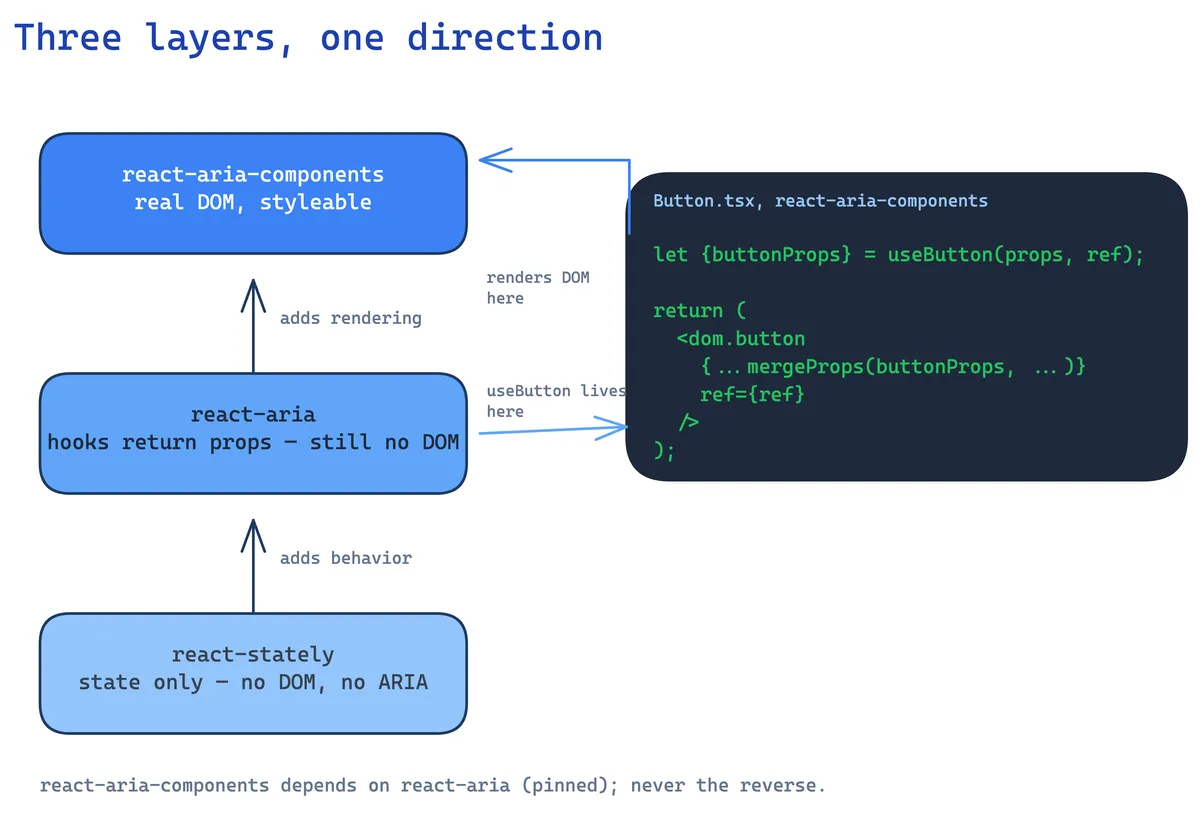
Same useButton, same buttonProps, spread onto a real DOM element — just with more mixed in (focusProps from useFocusRing, hoverProps from useHover, render-prop state for styling). react-aria-components's <Button> isn't a reimplementation of what react-aria does. It's the README's toy example, grown up: react-aria handles what makes this accessible, react-aria-components handles actually putting it on screen.
Confirmed by what each package actually depends on
Not just an architectural claim — check package.json:
// react-aria-components/package.json
"dependencies": {
  "react-aria": "3.52.1",
  "react-stately": "3.50.0",
  ...
}
react-aria-components depends on react-aria, pinned to an exact version. react-aria's own package.json has no dependency on react-aria-components anywhere — the relationship only goes one direction. One package is the hooks; the other wraps them.
There's a third layer underneath both
react-stately's README states its job in one line: "React Stately only provides state management, with no assumptions about the DOM or other view systems." No ARIA attributes, no keyboard handling, no rendering — just "is this open," "what's selected," as plain hooks. Both react-aria and react-aria-components depend on it. So the real stack is three layers, not two:
- react-stately — state only. What's selected, is it open. No DOM, no accessibility.
- react-aria — adds accessibility and interaction behavior as hooks. Returns prop objects. Still no DOM.
- react-aria-components — consumes both, renders real, styleable DOM.
Each layer adds exactly one thing the layer below deliberately left out.
So why not just use react-aria directly?
You can — that's the point of it existing as its own package rather than being folded straight into react-aria-components. If you're building a design system from scratch with your own exact markup, your own class names, your own component boundaries, react-aria's hooks give you the accessibility and behavior logic without handing you any opinions about what the DOM should look like. react-aria-components is for the much more common case: you want the same accessibility and behavior, but you don't want to write your own useButton-to-<dom.button> wiring fifty times for fifty components — someone already did that part, and left you the styling.
Neither package is the "right" one. They're the same hooks, at two different distances from the DOM — pick based on how much of that wiring you actually want to own yourself.